

Spreadshirt Guidance for Users - Intellectual Property Issues
Table of contents
1. What is “intellectual property?
“Intellectual property” refers to a broad area of the law, but for purposes of Spreadshirt users, it usually means rights under the law of copyright, trademark, and publicity. The U.S. Patent and Trademark Office provides a short overview here of copyrights, trademarks, and patents:
https://www.uspto.gov/trademarks-getting-started/trademark-basics/trademark-patent-or-copyright
2. Copyright
Copyright protects original works of authorship like photographs, drawings, writings, and recordings. The owner of a copyright in a work has the right to prevents others from using the work in certain ways, like copying it, making derivative works based on it (for example translations or sequels), and distributing, publishing, or displaying the work. Rights in copyright come into existence as soon as any eligible work is reduced to a fixed medium, like being written down, recorded, saved on a computer, etc. Federal registration is available, but not required, to create rights in copyright. For more information:
http://www.copyright.gov
https://en.wikipedia.org/wiki/Copyright
3. Trademark
A trademark is any symbol (words, images, sounds, smells, colors, etc.) which communicates to consumers the source of goods or services when used in commerce (i.e., offered for sale). The owner of a trademark may prevent others from using the trademark in commerce in ways which would create a likelihood of confusion as to the source, sponsorship, or affiliation of the goods or services referenced in the commercial use. Trademark rights come into existence through actual use in commerce and/or through formal registration with state or federal government. For more information:
https://en.wikipedia.org/wiki/Trademark
4. Publicity
The right of publicity is an individual’s right to control the commercial use of their likeness. A person’s likeness includes that person’s appearance, voice, mannerisms, catch-phrases, and other identifiers like nicknames, stage names, etc. All persons have these rights and no special acts or registrations are required to secure a person’s right of publicity in his or her own likeness. For more information:
https://en.wikipedia.org/wiki/Personality_rights
5. How does Spreadshirt help me to protect my content?
Spreadshirt adds a watermark to all high-resolution previews of designs, which makes it more difficult for third parties to copy your designs. What can I do as a user to protect my content? The steps you can take to protect your content depend upon what the content is, how it was created, and how it is used. You should consult an attorney who is familiar with intellectual property issues to get a personalized answer. Spreadshirt cannot give legal advice to users.
6. What can I do as a user if one of my designs has been stolen?
If you believe your design has been used by someone else online, you may try sending a DMCA notice to the website hosting the content. This website will generate the notice automatically:
http://www.whoishostingthis.com/resources/dmca/#generator
If you believe another Spreadshirt user has used your content without permission, you may send the same DMCA notice by clicking the “Report Design” link at the bottom of the design page, or by emailing the notice to [email protected].
For complete details, see https://www.spreadshirt.com/dmca-notice-C6804.
IMPORTANT NOTICE
The content above is provided for informational purposes only, and is not a substitute for legal advice. You acknowledge that your use of the information above is at your own risk.
Spreadshirt has attempted to ensure the information above is accurate, but cannot guarantee that it is complete, relevant for your circumstances, or up-to-date at all times. We cannot provide legal advice to users and recommend that you consult a lawyer if you have legal questions.
A guide to more sales
Your designs are uploaded, your Shop is ready to go - and now? Do you wonder how to make people aware of your online business? We’ve got something to get you kick-started: Our success guideline for Shop Owners. Get expert advice and find out which steps to take to make your Shop successful. Learn a few tricks and tips to drive customer traffic to your Shop.

In the fast lane: Quick success for your Shop

Guess less, know more: Targeted marketing strategies

Focus on your strengths: Sound advice for more sales
Reach a massive audience on Spreadshirt’s Marketplace. Over 2.4 million customers scour the Marketplace every month, offering you a huge audience for your designs. Sell with absolutely no risk! Upload your designs, and make them available on the Marketplace. We do everything else, from storage to customer service. In addition, you have the opportunity to be showcased in our Designer of the Month feature and the chance to have your designs sold on external marketplaces like Amazon and eBay.
1. Think of a concept
What distinguishes your concept from others? It’s important to find your niche and to cater your designs to your peer group. It’s definitely an advantage to be part of that group, particularly in the beginning. Of course, creating some outstanding designs on these classic topics is always an option, too. Try a few different styles and different topics if you’re not really sure what to settle on. Our blog articles provide you with helpful information on how you can approach your peer group in a targeted way. Here you can find sound advice.
2. Choose your graphics tool
Opt for a tool that meets both your demands and skill level. We’ve put together a little selection of tools. Some of them cost a pretty penny; others are free.
Complex image rendering (color, contrast, cropping, straightening, etc.) and more can be done with Adobe Photoshop, Affinity Photo or Gimp.
Creating vector graphics such as illustrations, logos and symbols can be nicely achieved with Adobe Illustrator, Affinity Designer or Inkscape. All vector-based software programs support scalable vector graphics (SVG).
Once you get the hang of it, you’ll be able to render your vector-based graphics into pixel graphics. You can also create filter effects and make other edits. And if you need help with the realization of your design ideas, our Graphics Service will be glad to lend a hand.
| High price | Cheaper | Free |

Adobe Photoshop |

Affinity Photo |

Gimp |

Adobe Illustrator |

Affinity Designer |

Inkscape |
3. Keywords, Product Selection, Design Price
Keywords
Your designs should be tagged with keywords that really fit their theme. Try to imagine what kind of search terms your customers would use to find your design when browsing the Marketplace. Useful keyword tools are: Google AdWords-Keyword-Planer, kwfinder and Hypersuggest.
Products
Publish your designs on as many fitting products as possible. The more products you offer, the better the selection you offer your customers. If necessary, adjust the size and position of your design to the respective product to make a perfect first impression on your customers.
Design Price
After a while, you’ll get an idea of what your customers are willing to pay for a design. We recommend setting the design price between $2 and $3 to start. You can ask for more when offering high-quality designs with a higher artistic value.
Tip
A good tip for success in Spreadshirt’s Marketplace is to keep checking on trending topics as a source of inspiration for your designs. Instagram, Twitter, Facebook and Google help you get a feel for current trends. We recommend uploading new designs at least once a week.
4. Your personal profile: The Showroom
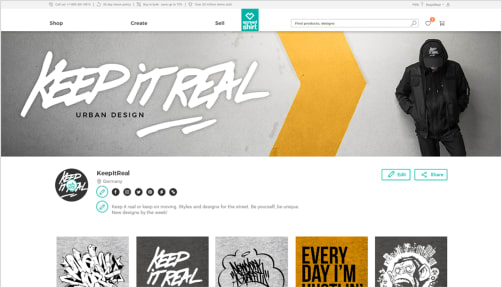
Have you already published a number of designs on the Marketplace? Then the Showroom will improve your visibility and help showcase your work. You can add a header image, some introductory text, and links to your social media channels. To find out how to properly whip your Showroom into shape, click here.
 5. Get your marketing right
- Canva and Placeit help you prepare creative social media posts such as promo announcements.
- In cooperation with Moo.com, we offer you a chance to create high-quality merchandise at a preferential price.
Build your own community, and get in touch with your fans and followers on a regular basis. Share your Showroom and designs on your social media channels. Be sure to share relevant designs your followers will like. This will help improve your ranking in the bestseller lists. On our blog, you’ll find more tips for social media marketing on Facebook and Instragram.
6. Keep up with the news & be proactive
- Keep checking our blog, and subscribe to our partner newsletter.
- Take part in our regular design contests. We’ll let you know about upcoming design contests on our blog and in the newsletter.
- To gain an even bigger reach, publish your designs on international platforms spreadshirt.net or spreadshirt.com if they fit the market.
- Download our SpreadStats to keep track of your sales at all times! We also provide you with useful seller info.
 |
 |
Design Inspiration and Graphic Trends
Your sales success rises and falls with how trendy your designs are. If you capture trending topics with your designs, you’ll increase your chances of selling.
Watch this space to find regular updates on hot topics, fresh trends and notable events. We usually try to run campaigns in the time leading up to these occasions: use them to promote your designs! Let yourself be inspired and offer the designs that are most in demand.
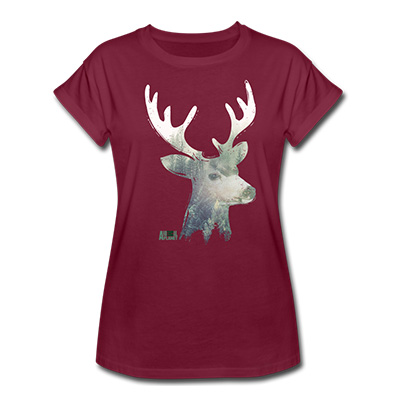
Double-exposure effect
Two super-imposed images result in a new image with multiple facets. A combination of two contrasting images, like animals and a landscape scene, gives the resulting image an artistic and slightly surreal impression.
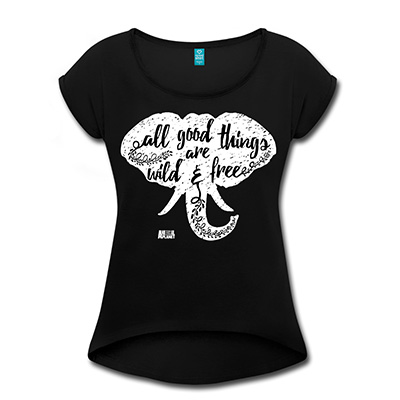
Handwriting with a digital brush
Chirography and artistic handwriting is a popular trend. Scripts created on graphics tablets and with paint brushes on Photoshop are completely in line with the 2018 trend.
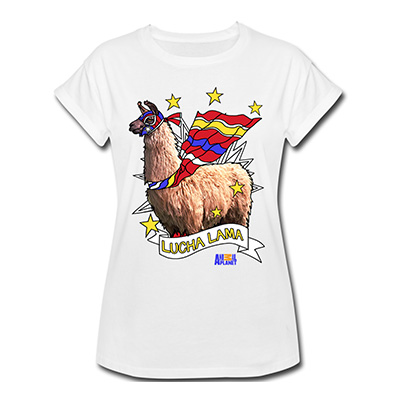
Superposition
The trick here is to impose comic-style illustrations on photos. This is how you create striking new compositions with an artistic appeal.
Seasonal trends and holidays
In the following list, you’ll find seasonal topics and those with a country-specific significance that tend to create big search volumes. Important! Always get your tags right before publishing your designs on Spreadshirt’s Marketplace. We’ve already suggested at least one suitable tag for each topic.
Tip: Combining graphic trends with the topics from this table is a clever strategy. And don’t forget that social-media sharing can improve your exposure. Think “jogging” your followers memory by drawing attention to your designs.
| Occasion | Date | DE | FR | NL | UK/IRL | US/NA | Scandinavia | Keyword |
|---|---|---|---|---|---|---|---|---|
| Movember | November | Beard | ||||||
| Grandfather Day | 10/07/2018 | grandfather | ||||||
| World Pasta Day | 10/25/2018 | pasta | ||||||
| Halloween | 10/31/2018 | horror | ||||||
| Day of the Dead | 11/02/2018 | RIP | ||||||
| Father’s Day | 11/11/2018 | father | ||||||
| Carnival season | 11/11/2018 | carnival | ||||||
| Veterans Day | 11/11/2018 | veterans | ||||||
| Thanksgiving | 11/22/2018 | thanksgiving | ||||||
| World Dart Championship | 11/14/2018 - 01/01/2019 | darts | ||||||
| Saint Nicholas | 12/05/2018 - 12/06/2018 | Saint Nicholas | ||||||
| Christmas | 12/24/2018 - 12/26/2018 | Christmas |
Find more inspiration on our Pinterest boards.